
 pl
pl  tr
tr  es
es  pt
pt  mn
mn  es
es  pt
pt How to Withdraw on KeyDrop – Step-by-Step Guide
 Get Bonus Now
What Can You Withdraw on KeyDrop?
KeyDrop withdrawals are based on CS2 skins, not direct cash payouts. After opening cases or receiving rewards, items are added to your KeyDrop inventory and can be withdrawn to your Steam account.
You can withdraw:
- CS2 skins from your KeyDrop inventory
- Items that meet the platform’s minimum withdrawal value
Balance itself cannot be withdrawn directly and must first be used to open cases.
Requirements Before Withdrawing on KeyDrop
Before you can withdraw items from KeyDrop, it’s important to make sure that all withdrawal conditions are met. Most failed or delayed withdrawals happen when one of these requirements is missing or incorrectly configured.
- Your Steam account is properly linked
Your KeyDrop account must be connected to a valid Steam account. Make sure the correct Steam profile is linked and that your Steam trade URL is added correctly. - Steam trade offers are enabled
Trade offers must be enabled in your Steam privacy settings. If trade offers are disabled or your inventory is private, withdrawal requests cannot be processed. - No Steam trade bans or restrictions
Your Steam account must not be trade-banned, limited, or under any temporary restrictions. Accounts with active trade holds or community bans cannot receive items. - Item meets the minimum withdrawal value
Only items that meet the platform’s minimum withdrawal value can be withdrawn. Items below this threshold may need to be sold or combined with others. - All cooldowns have passed
Certain items or accounts may be subject to cooldown periods. You’ll need to wait until these cooldowns expire before requesting a withdrawal.
Most withdrawal issues occur when one of these requirements is not met. Double-checking them in advance helps ensure a smooth and fast withdrawal process.
How to Withdraw on KeyDrop – Step by Step
The withdrawal guide explains how to safely cash out skins and funds on KeyDrop while avoiding common mistakes during the process, which perfectly complements the general information available on KeydropCode.
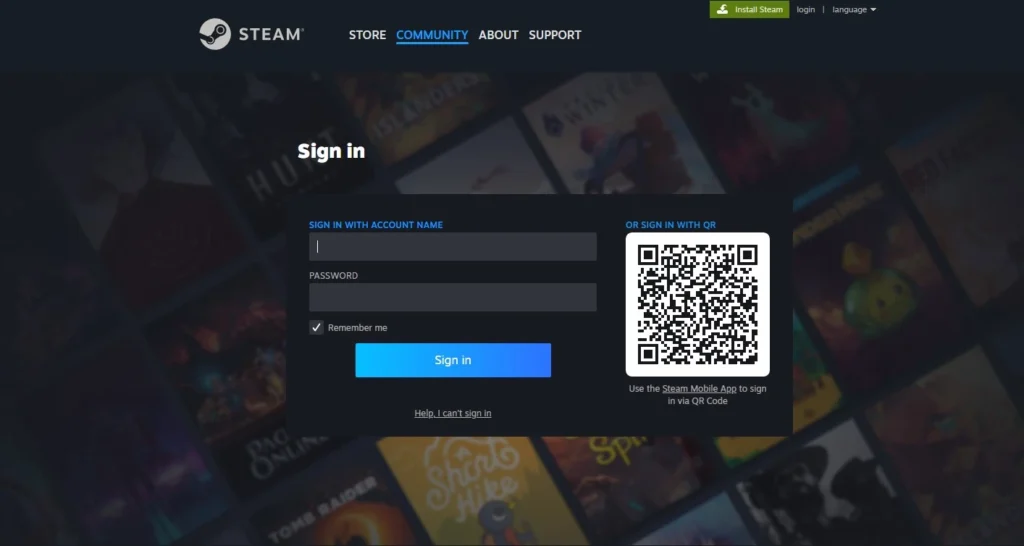
Step 1: Log In to Your Account
Sign in to your KeyDrop account and make sure your Steam account is connected correctly.
Step 2: Open Your Inventory
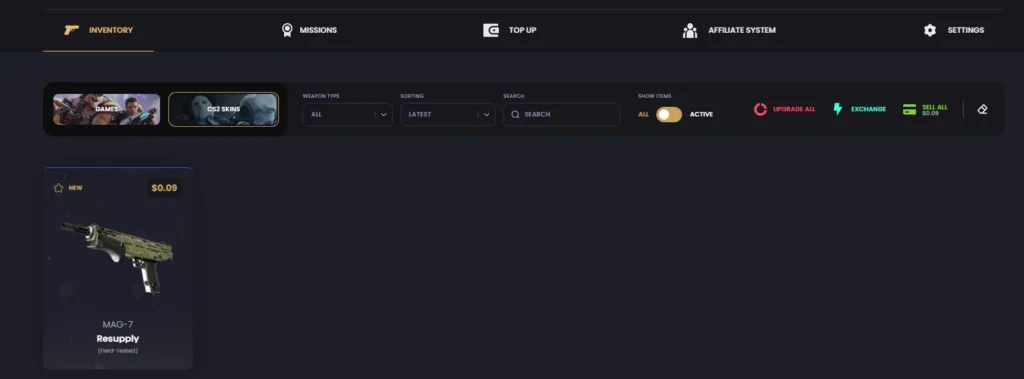
Go to your KeyDrop inventory to see all available skins eligible for withdrawal.
Step 3: Select Items to Withdraw
Choose the skin or skins you want to withdraw. Items below the minimum value may not be eligible.
Step 4: Request Withdrawal
Click the withdrawal option and confirm the trade request.
Step 5: Accept the Steam Trade Offer
You’ll receive a Steam trade offer. Accept it within Steam to complete the withdrawal.
Once accepted, the skin will appear in your Steam inventory.
If you prefer an alternative to direct withdrawals, you can also use your balance for KeyDrop gift cards, which can be redeemed for supported services and platforms.
Withdrawal Time on KeyDrop
Most KeyDrop withdrawals are processed within minutes, but delays can happen due to:
- Steam trade cooldowns
- High platform traffic
- Inventory availability
If a trade is delayed, it’s usually related to Steam rather than KeyDrop itself.
To get extra value beyond standard withdrawals, you can activate special rewards using the KeyDrop Golden Code, which unlocks additional bonuses on the platform.
Minimum Withdrawal Limits
KeyDrop applies minimum withdrawal thresholds to maintain fair use of the platform and prevent system abuse. The exact minimum value may vary depending on current market conditions, item availability, and account activity, so it’s important to review the requirements before placing a withdrawal request.
Using features such as a golden code or topping up your balance with a gift card can help you reach the required withdrawal minimum faster. To avoid delays or rejected requests, always verify the latest minimum withdrawal limits directly in your KeyDrop account dashboard.
Common Withdrawal Problems and How to Fix Them
Steam Trade Offer Not Received
Check if:
- Your Steam trade URL is correct
- Trade offers are enabled
- Your Steam account is not restricted
Withdrawal Button Is Disabled
This usually means:
- The item value is below the minimum
- A cooldown is active
- The item is not currently available
Trade Was Canceled
Canceled trades often happen when:
- The item is no longer in stock
- The trade was not accepted in time
In most cases, you can retry the withdrawal.
Is It Safe to Withdraw on KeyDrop?
Yes. Withdrawing on KeyDrop is considered safe as long as:
- You follow platform rules
- You accept trades only through official Steam offers
- You avoid third-party services or extensions
Withdrawing on KeyDrop is generally considered safe, and many users view KeyDrop legit as long as basic security practices are followed. This includes complying with platform rules, accepting withdrawals only through official Steam trade offers, and avoiding third-party services or browser extensions.
For a detailed breakdown of KeyDrop’s features, bonuses, and overall reliability, make sure to read the full KeyDrop review.